


Remote Work Productivity Tips – Remote work isn’t a single lifestyle — it’s a mix of environments, roles and rhythms. For some people it’s blissful deep-work time; for others it’s a swirl of distractions, video calls and vague boundaries. This article gives a practical, research-backed playbook to stay focused and productive at home: real setup advice, time management systems, burnout prevention, tool recommendations, and routines you can implement this week.
Note: Important context — remote and hybrid work levels have stabilized since the pandemic. A broad mix of hybrid and fully remote roles persists across industries, and employers increasingly expect workers to manage output and wellbeing proactively.
Workplace research shows that hybrid work has largely stabilized in the post-pandemic economy, with many employees continuing to split time between home and office rather than returning fully on-site. See Gallup’s analysis of the evolving workplace: Hybrid work trends and data.
Table of Contents
1) Why remote work feels different (the common challenges)
Before we get to tactics, it helps to name the problems most remote workers face:
- blurred work/home boundaries (work spills into personal time)
- frequent context switching (chat pings, email, meetings)
- meeting overload and “Zoom fatigue”
- loneliness and weaker informal collaboration vs office life
- equipment and ergonomics issues that reduce energy and focus
Data show remote workers are numerous and varied: hybrid arrangements are common, full-time remote is significant, and adoption rose dramatically since 2020. That makes designing reliable routines essential — the environment won’t fix itself.
2) Create a productive home workspace (practical, low-cost fixes)
A dedicated workspace is the foundation of a reliable routine. You don’t need a separate room, but you do need consistent signals for your brain.
Essentials checklist
- Dedicated spot: even a corner with the same desk and chair helps.
- Ergonomics: monitor at eye level, feet flat, wrist neutral; use an external keyboard and mouse.
- Lighting: bright, indirect daylight if possible; an adjustable desk lamp for late work.
- Noise control: noise-cancelling headphones, a white-noise machine, or soft background music for focus.
- Visual boundaries: a shelf, plant, or screen can separate “work” from “home” cues.
- Fast, reliable internet: wired Ethernet or strong Wi-Fi to avoid call drops.
Small investments that pay: an ergonomic chair, a monitor, a second screen (or a good laptop stand). If budget is tight, prioritize a supportive chair and proper monitor height (use books as stands if needed).
3) Time management strategies that actually work
Remote work rewards self-management. Use systems that force structure and make progress visible.
Studies of hybrid and remote workplaces suggest productivity and engagement often improve when employees have flexibility and clear performance expectations, especially when supported by effective leadership and communication systems. See Gallup’s research on managing remote and hybrid teams.
- Blocked calendars + transition buffers
- Time-block your day. Put deep work (2–3 hourly blocks) on your calendar and mark them busy.
- Transition buffers. Add 10–15 minute buffers before and after meetings to reset, take notes and avoid meeting spillover. This single habit reduces exhaustion and prevents consecutive Zoom calls from wiping out your day. (Managers and teams should encourage buffers to protect focus time.)
- Focus sprints (Pomodoro + microshifting)
- Pomodoro: 25–50 minutes focused work + 5–10 minute break.
- Microshifting: align work to energy peaks — research and product teams report gains by scheduling demanding tasks during high-energy windows and shallow tasks at low-energy moments. This can be especially useful for parents or caregivers with fragmented days.
- Asynchronous-first mindset
- Prefer async updates (short doc summaries, recorded Loom videos) over quick calls. Asynchronous work reduces scheduling friction, increases deep work time, and respects time-zone differences. Tools below make async work painless.
- The two-minute and the one-day rules
- Two-minute rule: if a task takes <2 minutes, do it now (prevents small tasks piling up).
- One-day rule: if a task won’t be completed within the day, schedule it explicitly — don’t let it sit in an overflowing to-do list.
4) Meeting hygiene: make every meeting earn its place
Meetings are the biggest time sink. Do these small changes:
- Agenda + outcome: every meeting should list purpose and desired outcome in the invite.
- Shorter default: default meeting length = 25 or 50 minutes, not 30/60. Shorter meetings force focus.
- Clear role assignments: owner, facilitator, note-taker, and next steps.
- Async alternatives: use recorded updates or shared docs for status reports.
- Meeting-free blocks/days: protect deep work windows across teams.
These tactics reduce the “meeting tax” and restore hours for focused work.
5) Avoiding burnout: the soft skills and the hard rules
Burnout at home tends to come from always-on work and poor recovery. Prevention is partly systemic (company policy) and partly personal.
Daily recovery routines
- End-of-day ritual: stop work with a consistent signal (walk, tidy desk, switch off a single “work” device).
- Micro-breaks: stand, stretch, hydrate every 45–60 minutes.
- Sleep priority: keep a stable bedtime; avoid screens 60–90 minutes before sleep. Good sleep is the multiplier for focus.
- Social connection: schedule weekly social calls with teammates; water-cooler chat matters for belonging.
Boundary rules to set with managers and colleagues
- Core hours vs flexible hours: agree on a small window for live collaboration (e.g., 10:30–3:30) and make other hours async.
- Email/call expectations: clarify expected response times and urgent contact channels.
- Right to disconnect: if company policy allows, enforce no-work evenings or weekends.
Organizationally, Gallup and other studies warn that remote-only workers sometimes struggle more with wellbeing than hybrid peers — managers must check in and design social support intentionally.
6) Best productivity tools (pick a compact stack)
A focused toolkit reduces context switching. Pick 3–5 tools and master them — more apps = more friction.
Recommended stack (balanced for async + live work)
- Project & task management: ClickUp or Asana — choose one for team task tracking and priorities.
- Real-time chat: Slack — short conversations, channels, and integrations.
- Video conferencing: Zoom — for synchronous meetings and webinars.
- Documentation / knowledge base: Notion or a shared Drive — centralize meeting notes, SOPs and templates.
- Time tracking / focus analytics: RescueTime, Toggl, or Clockify (pick one) to measure focus and spot time sinks.
- Async video: Loom for short walkthroughs and demos (reduces unnecessary live meetings).
Tool tips
- Integrate tools where possible (Slack + task manager + calendar) to reduce app switching.
- Use automated status messages (Slack focus mode, calendar blocking) to signal availability.
- Limit push notifications; treat chat as “pull” information unless urgent.
7) Daily routines that scale
Sample daily routine for productive remote workers
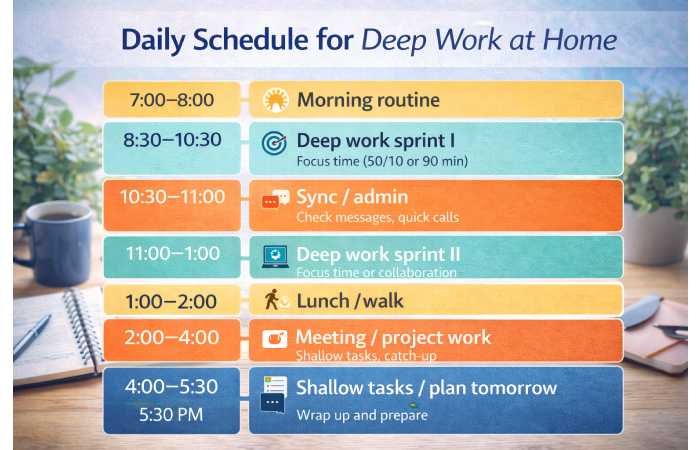
- 7:00–8:00 AM — Morning routine: wake, light exercise, breakfast, review top 3 priorities.
- 8:30–10:30 AM — Deep work sprint I: focused, no meetings (Pomodoro or 50/10).
- 10:30–11:00 AM — Short sync / admin: check messages, quick calls.
- 11:00–1:00 PM — Deep work sprint II / collaborative time if needed.
- 1:00–2:00 PM — Lunch + short walk (reset).
- 2:00–4:00 PM — Meetings / async catch-up / project work.
- 4:00–5:30 PM — Shallow tasks & planning for tomorrow.
- 5:30 PM — End-of-day ritual: close laptop, update status, quick tidy.
Adjust to your chronotype (shift deep work to morning or afternoon). The key is predictable patterns that colleagues can rely on.
8) Measure what matters: signals of productivity (not busyness)
Instead of hours worked, track outcomes:
- completed projects / features / deliverables per week
- cycle time (task start → completion)
- planned vs unplanned work ratio (lower unplanned = more stability)
- focus time hours per week (from RescueTime/Toggl)
- health signals: consistent sleep, energy and fewer meetings outside core hours
Quantifying outputs helps you argue for policy changes (like meeting-free days) and shows real value to managers.
9) Collaboration norms for remote teams
Clear norms reduce friction:
- Document decisions: don’t rely on verbal memory — publish decisions and next steps.
- Use async updates: short weekly written summaries replace status meetings.
- Design meeting roles: facilitator, timekeeper, and scribe to keep meetings tight.
- Rotate meeting times for global teams to share burdens fairly.
Teams with strong async habits see fewer context switches and more predictable output. Tooling like Notion or shared docs is essential for this.
10) Troubleshooting common problems
1st Problem: I’m distracted all day.
- Fix: Use site blockers during deep work (Cold Turkey, Freedom), set Pomodoro blocks and turn off notifications.
2nd Problem: Meetings eat my day.
- Fix: Enforce agenda requirement, reduce meeting frequency, and replace status calls with a shared status doc.
3rd Problem: I feel lonely and disconnected.
- Fix: Schedule 1:1 social coffee chats, join an interest-based team channel, or set a weekly team ritual.
4th Problem: My home setup hurts my back/neck.
- Fix: Adjust monitor height, add lumbar support, take hourly micro-breaks, and do short mobility routines.
11) Quick reference — 10 rules to implement this week
- Block two 90-minute deep work slots on your calendar each day.
- Add 10-minute transition buffers between meetings.
- Pick one project manager and one chat app only — stop adding new tools.
- Use Pomodoro or 50/10 sprints for focus.
- Enforce a daily end time and an end-of-day ritual.
- Turn off nonessential notifications during focus time.
- Walk or move for 20 minutes midday.
- Do one async video (Loom) instead of a short meeting this week.
- Track focus time for three days and identify top time sinks.
- Schedule one social check-in with a colleague (nonwork chat).
12) Tools comparison table (pick one from each row)
| Need | Recommended tools |
| Project & tasks | Asana · ClickUp · Trello. |
| Real-time chat | Slack. |
| Video calls | Zoom. |
| Docs & knowledge | Notion or Google Drive. |
| Focus & tracking | RescueTime · Toggl · Clockify (pick one). |
Tip: commit to a single tool per need and document how teams should use it (folders, naming, pinning).
FAQs
Q: Are remote workers more productive than office workers?
A: Many studies show remote or hybrid workers report similar or higher productivity when properly supported — but wellbeing and thriving may lag for fully remote workers unless social and managerial support is intentional.
Q: What’s the best time-management method for remote work?
A: Combine calendar blocking for deep work with shorter Pomodoro sprints and microshifts to align with your energy. Experiment and measure focus time.
Q: How many tools are too many?
A: If you’re switching between more than 5–7 apps daily, you likely have too many. Narrow to a compact stack: task manager, chat, video, docs, and one focus tracker.
Q: How do I avoid burnout working from home?
A: Prioritize boundaries (end-of-day ritual), sleep, movement, and social connection. Use transition buffers and ensure downtime is protected.
Final Conclusion
Remote work offers flexibility, but staying productive at home requires deliberate design. Use the strategies above — a dedicated workspace, time-blocking + buffers, focused sprints, a compact tool stack, and clear social norms — to protect focus and prevent burnout. Start with two small changes this week (block a deep work slot and add transition buffers) and build from there. With intentional routines, remote work productivity is not just possible — it’s repeatable and scalable across teams.